
Choosing a website platform can feel overwhelming, especially when every option claims to be easy, affordable, and great for growth. If you are comparing WordPress vs Wix vs Squarespace, the right choice depends on how much control you want, how fast you need to launch, and how serious you are about long-term SEO and scalability.
WordPress vs Wix vs Squarespace at a Glance
For many small business owners, the decision comes down to three priorities: ease, flexibility, and growth. Wix and Squarespace are all-in-one website builders that make it simple to get online quickly, while WordPress gives you more control and room to grow if you are willing to handle a slightly steeper learning curve.
If you want the best website builder for small business with the least setup, Wix or Squarespace may be enough. If you want a site that can become a serious marketing asset over time, WordPress is usually the stronger long-term choice.
| Platform | Best For | Quick Take |
|---|---|---|
| WordPress | Growing businesses, SEO-focused sites, content-heavy websites, custom features | Most flexible and scalable, but requires more setup and maintenance |
| Wix | Simple small business sites, service businesses, quick launches | Very easy to use, but less flexible as your needs grow |
| Squarespace | Design-focused brands, portfolios, restaurants, creatives | Beautiful templates and simple tools, but fewer advanced customization options |
WordPress: Best for Control, SEO, and Long-Term Growth
WordPress is best for businesses that want ownership, flexibility, and room to expand. It powers a huge portion of the web because it can support everything from a five-page local business website to a large content hub, online store, membership site, or custom booking platform.
In terms of ease of use, WordPress is not quite as beginner-friendly as Wix or Squarespace out of the box. You will need hosting, a theme, plugins, updates, and some basic setup. That said, once a professional builds the foundation properly, day-to-day editing can be very manageable for non-technical business owners.
Where WordPress really wins is design control, SEO strength, and scalability. You can customize nearly every part of your site, optimize technical SEO, build custom page layouts, add advanced integrations, and keep full ownership of your content. The main drawback is that WordPress requires more responsibility, so it is often best when paired with a web designer or agency that can set it up the right way.
Typical pricing range:
- Hosting: around $10 to $50+ per month
- Premium themes or plugins: varies widely
- Professional design and development: often a larger upfront investment
- Ongoing maintenance: recommended for security, updates, and performance
Best fit for:
- Businesses focused on SEO and lead generation
- Companies planning to scale
- Blogs, resource centers, and content-heavy sites
- Businesses that need custom features or integrations
Main drawback: WordPress has more moving parts, so it can feel overwhelming without the right setup and support.
Wix: Best for Fast, Simple Websites
Wix is a strong choice for small businesses that need a clean, simple website without hiring a developer. Its drag-and-drop editor is easy to understand, and most business owners can build a basic site themselves with limited technical experience.
When comparing WordPress vs Wix, Wix usually wins on speed and simplicity. You can choose a template, add your logo, update your text, connect a domain, and publish quickly. For a simple brochure website, such as a home page, about page, services page, and contact form, Wix can work very well.
The tradeoff is flexibility. Wix has improved a lot over the years, including its SEO tools, but it still does not offer the same level of control as WordPress. If your business grows and you later need advanced SEO, complex content structures, custom functionality, or deeper integrations, you may eventually feel limited.
Typical pricing range:
- Monthly plans generally range from budget-friendly personal plans to higher business and ecommerce plans
- Hosting and security are included
- Apps and premium features can increase the total cost
Best fit for:
- Service businesses that need a simple online presence
- Startups testing an idea
- Small businesses that want to launch quickly
- Owners who want to make edits themselves without much training
Main drawback: Wix is easy to start with, but it can be harder to scale beyond the platform’s built-in structure.
Squarespace: Best for Polished Design and Simple Management
Squarespace is known for its attractive templates and polished design style. It is especially popular with creatives, consultants, restaurants, photographers, wellness brands, and small businesses that want a visually appealing website without custom development.
In a WordPress vs Squarespace comparison, Squarespace is usually easier to manage but less flexible. You do not need to worry about hosting, plugin updates, or technical maintenance. The platform is all-in-one, which makes it simple and predictable for busy business owners.
Squarespace also offers solid built-in features for blogging, portfolios, appointment scheduling, basic ecommerce, and email campaigns. However, if you need very specific design control, advanced SEO customization, or custom functionality, it can feel more restrictive than WordPress. It sits nicely between Wix and WordPress in some ways: more design-focused than Wix, but less expandable than WordPress.
Typical pricing range:
- Monthly plans are usually straightforward and include hosting
- Ecommerce and advanced features cost more
- Fewer third-party add-ons than WordPress, which can simplify costs
Best fit for:
- Design-focused small businesses
- Creative professionals and portfolios
- Restaurants, coaches, consultants, and boutique brands
- Businesses that want a polished site without much technical work
Main drawback: Squarespace looks great, but advanced customization and scalability are limited compared with WordPress.
Side-by-Side Website Platform Comparison
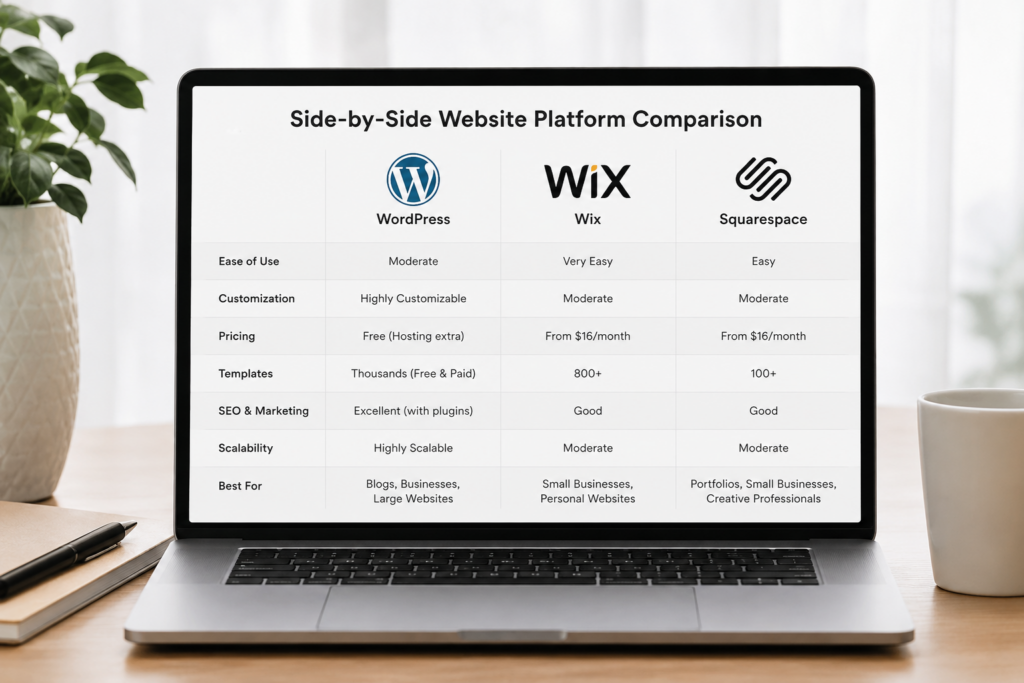
A clear website platform comparison helps you see where each option stands. There is no one-size-fits-all answer, because the best choice depends on whether your business values simplicity, design, SEO, or growth the most.
If you want the easiest possible path, Wix is usually the simplest. If you want a beautiful site with less technical maintenance, Squarespace is a great middle ground. If you want long-term control, stronger SEO potential, and the ability to build almost anything, WordPress is the most powerful option.
| Feature | WordPress | Wix | Squarespace |
|---|---|---|---|
| Ease of use | Moderate learning curve, easier with a pro setup | Very beginner-friendly | Beginner-friendly with structured editing |
| Design control | Very high, almost fully customizable | Good, but within Wix’s system | Strong templates, less deep customization |
| SEO | Excellent potential with the right setup | Good for basics, improved over time | Good for standard SEO needs |
| Scalability | Excellent for growing businesses | Best for simple to moderate sites | Good for small to mid-sized sites |
| Pricing | Flexible, but can include hosting, plugins, and maintenance | Predictable monthly plans | Predictable monthly plans |
| Support | Depends on host, theme, plugins, or agency | Centralized Wix support | Centralized Squarespace support |
The important thing to remember is that “easy” and “flexible” often pull in opposite directions. Wix and Squarespace are easier because they control more of the system for you. WordPress is more flexible because you have more control, but that also means more decisions.
Which One Is Right for Your Business?
Choosing between WordPress vs Wix vs Squarespace is really about choosing the platform that matches your business goals. A brand-new business with a small budget may need something fast and simple, while an established company may need a website that supports SEO, lead generation, ecommerce, and future growth.
Before you decide, think about where your business will be in two or three years. If your website only needs to explain who you are and help people contact you, a simple builder may be enough. If your website needs to become a long-term marketing engine, WordPress is usually the safer investment.
If You Need a Simple Brochure Site
If you need a basic website with a home page, services page, about page, testimonials, and contact form, Wix or Squarespace can both be good options. They are easy to manage, quick to launch, and do not require much technical knowledge.
Wix may be better if you want maximum ease and drag-and-drop freedom. Squarespace may be better if you want a more polished, template-driven design without spending too much time adjusting every detail.
WordPress can still be a great choice for a brochure site, especially if you care about SEO or expect to expand later. However, it may be more platform than you need if your only goal is to get a simple site online quickly.
If You Run an Online Store
For basic ecommerce, all three platforms can work. Wix and Squarespace offer built-in ecommerce tools that are good for smaller shops, simple product catalogs, digital products, and appointment-based services.
WordPress, when paired with WooCommerce, is usually stronger for stores that need more control. It can handle larger catalogs, custom checkout flows, advanced product filters, subscriptions, memberships, and more complex integrations.
If you plan to grow your online store seriously, WordPress is often the better long-term choice. If you only sell a few products or services, Wix or Squarespace may be simpler and more cost-effective.
If You Have a Blog or Content-Heavy Website
If content marketing is part of your strategy, WordPress is the clear leader. It started as a blogging platform and has grown into a full content management system, which makes it excellent for articles, guides, categories, tags, author pages, internal linking, and SEO structure.
Squarespace has blogging tools, and they are perfectly fine for lighter publishing. Wix also supports blogging, but it is not usually the first choice for businesses that plan to publish a lot of search-focused content.
For a company that wants to rank on Google, build topical authority, and turn blog posts into leads, WordPress gives you more control over SEO and content organization. This is one of the biggest reasons web designers often recommend WordPress for long-term growth.
If You Want Your Business to Scale
If your business is growing, WordPress is usually the strongest pick. It can support new landing pages, custom integrations, advanced analytics, CRM connections, marketing funnels, ecommerce, online courses, directories, and more.
Wix and Squarespace are not bad platforms, but they are more limited when your needs become very specific. They work best when your website fits neatly inside their existing tools and templates.
For a business that wants control, ownership, and flexibility, WordPress is the better foundation. In the Wix vs Squarespace debate, either can work for simpler sites, but WordPress is the platform most likely to grow with you over time.
FAQ: WordPress vs Wix vs Squarespace
Is WordPress better than Wix?
WordPress is better if you want more control, stronger SEO potential, and long-term scalability. Wix is better if you want the easiest way to build a simple website quickly.
Is Squarespace better than WordPress?
Squarespace is easier to manage and has beautiful templates, but WordPress is more flexible. If your site needs custom features, advanced SEO, or room to grow, WordPress is usually the stronger choice.
Which platform is best for SEO?
WordPress has the strongest SEO potential because it gives you more control over site structure, speed, metadata, schema, plugins, and content organization. Wix and Squarespace can handle basic SEO well, but they are less flexible.
What is the best website builder for small business?
The best website builder for small business depends on your goals. Wix is best for quick and simple sites, Squarespace is best for polished design, and WordPress is best for growth, SEO, and customization.
Can I switch from Wix or Squarespace to WordPress later?
Yes, but it is not always a simple one-click move. Content, design, SEO settings, images, and URLs may need to be rebuilt or redirected carefully to avoid losing traffic.
If you want the fastest and simplest path, Wix or Squarespace can be excellent choices for a small business website. But if you want long-term flexibility, stronger SEO, and a site that can grow with your business, WordPress is usually the best investment. If you are still unsure, Axess Web Design can help you compare your options, plan the right structure, and build a website that fits where your business is now and where it is going next.
Contact Axess Web Design:
Kyle Lawrence
Owner, Axess Web Design
Email: axesswebdesign@gmail.com
Phone: 509-255-3715
Website: www.axesswebdesign.com
Location: Post Falls, ID (Serving Spokane, WA and the Pacific Northwest)
Services: Web Design | WordPress Development | SEO | Digital Marketing | E-commerce | Branding